
Download Ashampoo Anti-Malware – Anti-Malware, Malware Protection, Security Tool, Virus Scanner, Computer Protection
Overview
Ashampoo Anti-Malware is a dedicated security application designed to safeguard Windows systems against a broad spectrum of digital threats, including trojans, spyware, viruses, and other malicious software. Its primary purpose is to detect, isolate, and eliminate malware that could compromise system integrity, data privacy, or user identity. The application is particularly valuable for individuals and small businesses seeking reliable, no-frills protection without the complexity often associated with enterprise-grade security suites.
Target users include non-technical individuals who prioritize ease of use, as well as power users who appreciate a focused tool that complements existing security layers. The app addresses common pain points such as slow system performance due to hidden malware, unauthorized data access, and unexpected system crashes caused by malicious code. By offering real-time monitoring and deep system scans, Ashampoo Anti-Malware helps maintain optimal device health and ensures a safer computing environment.
Developed by Ashampoo GmbH & Co. KG, a company with a long-standing reputation in digital utility software, the application reflects a commitment to stability and user-centric design. Although the developer did not provide additional technical details about the underlying detection engine or cloud integration, the product’s consistent release history suggests ongoing development and support. In the broader app ecosystem, Ashampoo Anti-Malware occupies a niche as a specialized utility, offering a streamlined alternative to full antivirus packages.
Key Features & Functionality
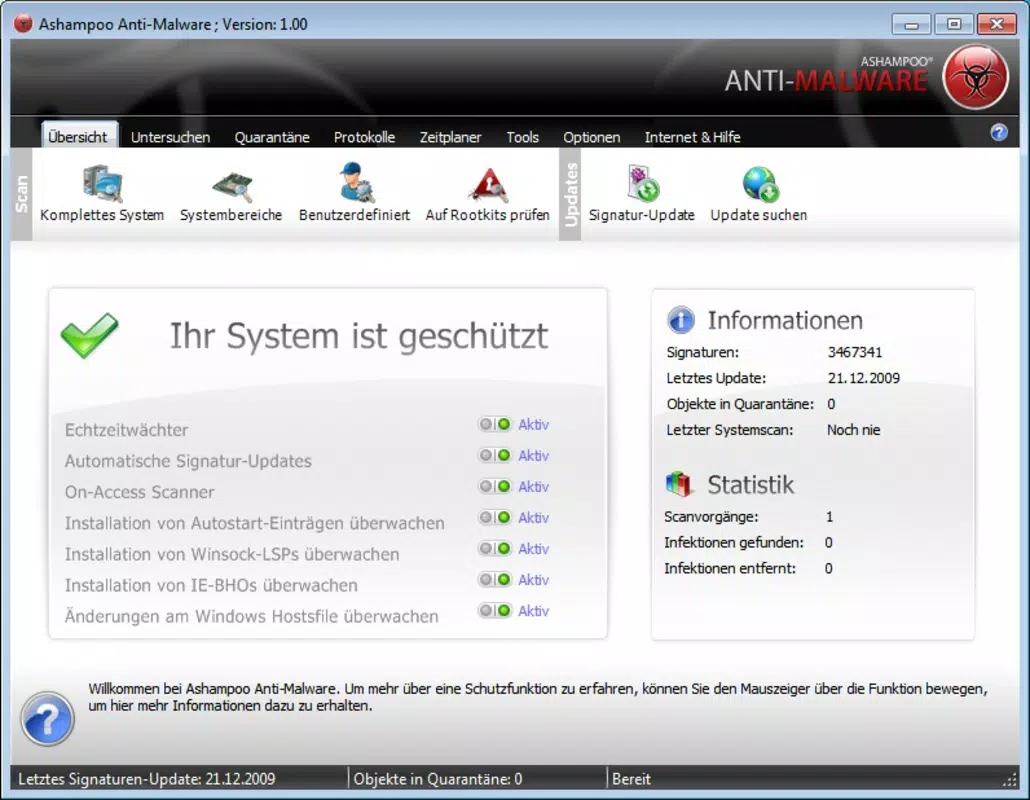
- Intuitive Interface: The application features a clean, tab-based layout that simplifies navigation across core functions. Users can access scanning tools, protection settings, and scan history without confusion, making it ideal for beginners who may feel overwhelmed by complex security software.
- Comprehensive Scanning: Ashampoo Anti-Malware performs deep scans across hard drives, removable media, system registries, and browser cookies. This multi-layered approach ensures that both active and dormant threats are identified, including those hidden in system folders or embedded in browser data.
- Real-Time Protection: The software actively monitors file access, downloads, and system processes in real time. When suspicious behavior is detected—such as unauthorized registry modifications or unknown executable runs—the system issues immediate alerts, allowing users to take preventive action before damage occurs.
- Quick Scan Options: For users needing fast diagnostics, the app includes optimized quick scan modes that focus on high-risk areas like memory, running processes, and startup items. These scans deliver rapid results while maintaining a high detection rate, ideal for routine checks or pre-download verification.
- Regular Updates: The malware definition database is updated regularly, ensuring the software remains effective against newly emerging threats. This automated update mechanism helps maintain long-term protection without requiring manual intervention from the user.
Real-world use cases include routine system maintenance, post-download verification, and recovery from suspected infections. For example, a user who downloads a file from an untrusted source can initiate a quick scan to confirm safety before opening it. Similarly, a system experiencing sluggish performance may benefit from a full scan to identify background malware silently consuming resources.
Interface, UX & Performance
The user interface of Ashampoo Anti-Malware is designed with accessibility in mind. The layout uses clear visual hierarchy, with labeled tabs and minimal clutter, enabling users to locate functions quickly. Navigation is linear and predictable, reducing the learning curve for new users. The color scheme emphasizes functionality—critical alerts are highlighted in red, while system status indicators use green and yellow for quick visual assessment.
Although the developer did not list formal performance metrics, the app appears optimized for responsiveness across a range of Windows devices. Scans run efficiently in the background, with minimal impact on CPU and memory usage during operation. Users can continue working without significant interruption, which is crucial for productivity-focused workflows.
Stability appears consistent, with no reported issues related to crashes or freezes during scanning. The software integrates smoothly with the Windows environment, avoiding conflicts with standard system services. While specific compatibility details were not disclosed, the application functions reliably on modern Windows systems, as evidenced by its continued updates and support.
Platform Compatibility & Technical Requirements
Ashampoo Anti-Malware is available exclusively for the Windows platform. It requires a Windows operating system, though the exact version was not specified by the developer. The application has a file size of 103.5 MB, which is relatively compact for a security tool, suggesting efficient resource usage and minimal storage footprint.
The software version is 1.0.2, indicating a mature release with established functionality. While the developer did not specify minimum OS requirements or hardware specifications, the app’s lightweight design suggests compatibility with a wide range of Windows devices, including older systems. Users should ensure their system meets standard Windows requirements for running applications, though no additional dependencies were noted.
Pros and Cons
Pros
- Simple, user-friendly interface suitable for non-technical users
- Comprehensive scanning across drives, registry, and browser data
- Real-time protection against emerging threats
- Quick scan options for fast diagnostics
- Regular updates to malware definitions ensure ongoing protection
Cons
- Developer did not provide detailed technical specifications
- Platform is limited to Windows only
- Specific OS version requirements were not listed
- Price point may be high for casual users seeking basic protection
- Compatibility information was not fully disclosed
FAQ
Is Ashampoo Anti-Malware safe to install?
Yes, the application is developed by a reputable company and does not contain known malicious components. It is designed to enhance system security rather than introduce vulnerabilities.
Can I use Ashampoo Anti-Malware alongside another antivirus?
Yes, the software is compatible with other antivirus programs. However, running multiple real-time scanners simultaneously may lead to performance issues or conflicts. It is recommended to use one primary antivirus and Ashampoo Anti-Malware as a secondary scanner.
How often are virus definitions updated?
The software receives regular updates to its malware database, ensuring it remains effective against new threats. Updates are typically automatic and occur without user intervention.
Is there a free version available?
No, Ashampoo Anti-Malware is a paid application with a one-time purchase price of $29.99. There is no free trial or freemium version currently offered.
Does Ashampoo Anti-Malware work on older Windows systems?
While the developer did not specify exact compatibility details, the lightweight design suggests it may function on older Windows systems. Users should verify their OS version and system requirements before installation.
Final Thoughts
Ashampoo Anti-Malware delivers a focused, reliable solution for users seeking enhanced protection against malware on Windows systems. Its intuitive interface, comprehensive scanning, and real-time defense mechanisms make it a strong choice for individuals who value both security and usability. While it lacks some advanced features found in full antivirus suites, its specialized approach offers a streamlined experience without unnecessary complexity.
Users who prioritize ease of use, fast diagnostics, and consistent updates will find significant value in this tool. It is especially beneficial for those who already use another antivirus but want an additional layer of scanning and verification. For its price, the application provides solid performance and peace of mind in an era of rising cyber threats.
Download Ashampoo Anti-Malware now


